



X2 Mini Pro Battery Life: Short Gaming Sessions vs Longer Play Sessions
Battery life is not one fixed number. A 25-minute commute, a two-hour evening session, and a full travel day place different demands on the same handheld. X2 Mini Pro is built around an 85Wh external, swappable battery, so the useful question is not only how long one charge lasts. It is how the player should balance power, display settings, and spare-battery planning for each session length.
Short sessions can spend more of the battery on performance and 144Hz responsiveness. Longer sessions benefit from a lower TDP, a frame-rate target, moderate brightness, and a charged spare when the route does not guarantee power.
One Battery, Three Session Strategies
The ONEXPLAYER X2 Mini Pro combines an 85Wh removable pack with Ryzen AI Max+ 388 and Radeon 8060S graphics. The 40-compute-unit GPU can use substantial power when a game and cooling mode allow it, but maximum performance is rarely the most efficient choice for every minute away from a charger.
The removable design changes the ownership model. A sealed battery forces the user to wait for charging or attach a power bank. X2 Mini Pro can also continue with a second charged pack, so a long day can be planned as two battery windows rather than one stretched window.
| Session type | Recommended priority | Useful settings | Power plan |
|---|---|---|---|
| 20–45 minutes | Fast response and visual quality | Higher TDP when needed, 144Hz and VRR, game-specific frame cap | Start above 50% and recharge later |
| 1–3 hours | Stable frame pacing and balanced draw | Moderate TDP, VRR, 40–60 FPS target, adjusted brightness | Carry the charger if an outlet is likely |
| Multi-stage travel day | Predictable energy budget | Lower TDP, 60Hz where appropriate, reduced background activity | Carry a charged spare battery or USB-C power source |
| Plugged-in desk play | Sustained performance | Higher power profile and cooling matched to the edition | Use direct power and battery-protection features |
Short Sessions Can Favor Performance
A short gaming window changes the optimization target. The player does not need to maximize hours per charge if the device will return to a charger after the commute or lunch break. That makes room for a higher TDP, a brighter screen, or a faster frame-rate target when the game benefits from them.
The 8.8-inch OLED panel supports 144Hz variable refresh rate and HDR. VRR is useful even when a demanding game cannot reach 144 FPS because it keeps the display synchronized with changing frame delivery. A sensible frame cap still matters. Asking the GPU to render frames that the player cannot distinguish in a specific game spends energy without improving the session proportionally.
For a 20-minute game, startup friction matters more than theoretical maximum runtime. Keep the controllers attached, use a saved OneXConsole profile, and resume a title with an appropriate frame target. The goal is to spend the available time playing rather than rebuilding settings.
Longer Sessions Need an Energy Budget
Longer play should begin with a target duration. A player who needs two hours can choose a different profile from someone trying to cover a flight segment without access to power. The selected TDP is only part of the draw; display brightness, refresh rate, wireless activity, memory traffic, storage, and fan speed also consume energy.
X2 Mini Pro's Ryzen AI Max+ 388 and Radeon 8060S provide substantial graphics headroom. For longer unplugged play, the efficient approach is to find the lowest power profile that maintains acceptable frame pacing in the chosen game. Lower resolution, a 40 or 60 FPS cap, and upscaling can often protect the experience more effectively than simply reducing every quality setting.
The site's TDP, FPS, battery, and noise comparison shows why this matters: X2 Mini Pro scales strongly as power rises, but higher performance also increases total draw and cooling demand. The best unplugged setting is therefore a balance point, not the highest available number.
The Swappable Pack Changes Long-Session Planning
The external 85Wh battery is the defining advantage for a long day. A second charged pack can extend total play without holding the device beside an outlet while the first pack recharges. That is especially useful on trains, in airports, or during events where charging access is intermittent.
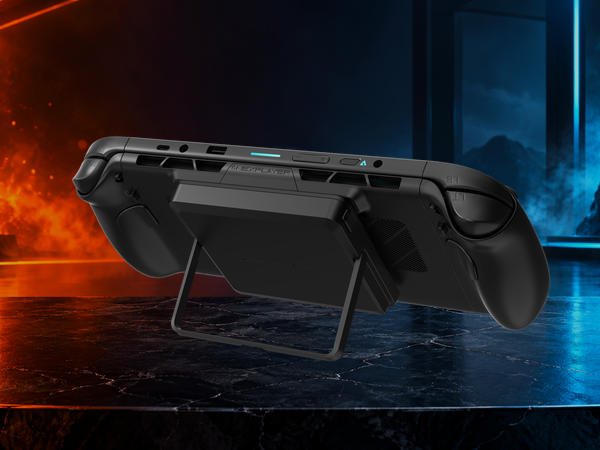
Battery swapping should be treated as a planned transition. Save the game, shut the system down or connect appropriate external power, replace the pack, and confirm the latch before resuming. The removable design extends the energy ceiling, but it does not turn a battery change into a live hot-swap while the device is running independently.
A spare battery also needs protection and charge management. Keep the contacts covered in transit, follow airline and carrier rules, and avoid loose storage beside metal objects. Charge both packs before departure, then use the older or less-charged pack first if the day includes a reliable outlet later.
Display Settings Matter More Than They Look
OLED gives the X2 Mini Pro strong contrast and true blacks, while 144Hz makes motion and input feel immediate. Neither setting is free. A bright screen and high refresh can consume energy throughout the entire session, even when the game itself is not demanding.
For a short session, keep 144Hz when it improves the title. For a longer session, test 60Hz with a 40 or 60 FPS cap. VRR remains valuable because it smooths normal fluctuations around the target. Brightness should match the environment rather than stay at a fixed high level indoors.
Game selection also changes the result. A turn-based title with a 30 or 40 FPS target can run under a conservative profile. A fast competitive game may justify higher refresh and power. A demanding AAA title can use upscaling and tuned quality settings to reduce GPU load without giving up the character of the game.
Build Profiles Around Real Games
One universal profile wastes the flexibility of the hardware. Save at least three patterns in OneXConsole: a short-session performance profile, a balanced portable profile, and a long-session efficiency profile. Each should define TDP, fan behavior, refresh rate, and the game's frame target.
Test the profile in the part of the game that creates the heaviest sustained load, not only in a menu or quiet indoor scene. Watch frame pacing, fan behavior, and battery percentage over a repeatable period. The objective is a stable experience for the intended duration rather than a single high benchmark result.
For plugged-in use, the standard and liquid-cooled editions have different cooling paths. The liquid-cooled edition is the one designed for the optional Frost Bay system. That choice matters for sustained desk performance, but it does not change the basic unplugged rule: battery life improves when the system is asked to do only the work the current game and session require.
Conclusion
X2 Mini Pro battery life is best understood as a set of choices. Short gaming sessions can prioritize performance, high refresh, and visual quality because recharge time is close. Longer sessions should use a defined frame target, lower power, moderate brightness, and a game-specific profile. A charged spare battery extends the total day when one pack is not enough.
The 85Wh removable design does not eliminate power planning. It makes that planning more flexible. Players who match each game to a session profile will get more useful play from the hardware than players who leave every title at the highest available settings. See current editions and battery options on the official X2 Mini Pro product page.
FAQ
How long can X2 Mini Pro run on a full charge?
Runtime varies with TDP, game load, frame-rate target, brightness, refresh rate, wireless use, and cooling behavior. X2 Mini Pro uses an 85Wh removable battery, so the most reliable plan is to test a game-specific profile and carry a charged spare for longer days.
Can X2 Mini Pro play large AAA games?
Yes. Ryzen AI Max+ 388 includes Radeon 8060S graphics with 40 compute units. Actual frame rate and battery use depend on the title, resolution, graphics preset, TDP, and whether upscaling is enabled.
Does X2 Mini Pro support external monitors or eGPU docks?
Yes. Its USB4 connection supports compatible displays, hubs, and external graphics docks such as ONEXGPU. X2 Mini Pro should not be described as having a native OCuLink port.
Is ONEXPLAYER hardware reliable for frequent battery changes?
ONEXPLAYER uses a managed production and quality-control process. For removable batteries, protect the contacts during transport, confirm the pack is fully latched, and follow the official charging and handling guidance.


